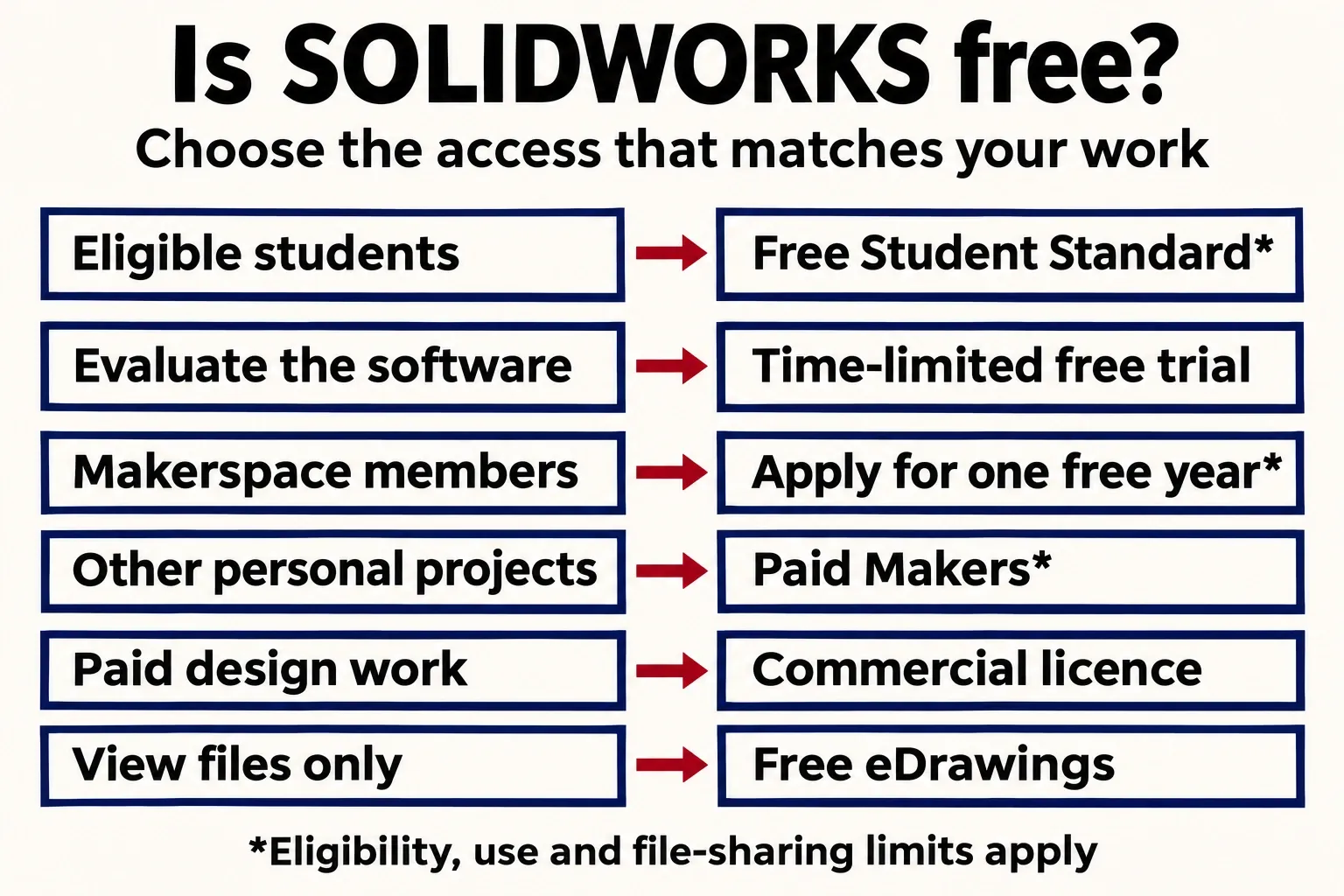
SOLIDWORKS Design Standard is free for qualified students for one year, with another application available while they remain eligible. Nonstudents can use a temporary evaluation or apply through a qualifying makerspace or hardware startup; the free eDrawings Viewer is for opening files rather than modelling them. There is no general, permanent free commercial SOLIDWORKS licence.
I'd choose the licence by the work and its next recipient before comparing prices. A bracket for a class assignment, the same bracket for a paying client and a model sent to another designer can need different access, even when the geometry looks identical.
Choose the route that covers your work
| Your task | Cost and route | Start here |
|---|---|---|
| Learn as an enrolled student | Free Standard, or school-provided access | Ask the school first; match the package to the course. |
| Try desktop SOLIDWORKS before buying | Free, temporary browser evaluation | Use the official product trial and download your work before leaving. |
| Make personal projects as a makerspace member | Free annual Makers offer if approved | Check the free-offer country list and submit membership details. |
| Develop your startup's own physical product | First year free if the startup is accepted | Check the business criteria before applying. |
| Practise or make hobby parts without those qualifications | Paid Makers subscription | Choose desktop SOLIDWORKS or browser xDesign; check file restrictions. |
| Open a supplied part, assembly or drawing | Free desktop eDrawings Viewer | Use the viewer if the model doesn't need editing. |
| Design for clients or other professional work | Commercial licence, or an approved business programme | Use an entitlement that covers that work. |
A free account, a training video and a downloadable installer are different from a modelling licence. The official Downloads index separates subscription CAD releases from free utilities such as eDrawings and Composer Player. Downloading the installer doesn't make the paid product free.
Students: check school access before requesting free Standard
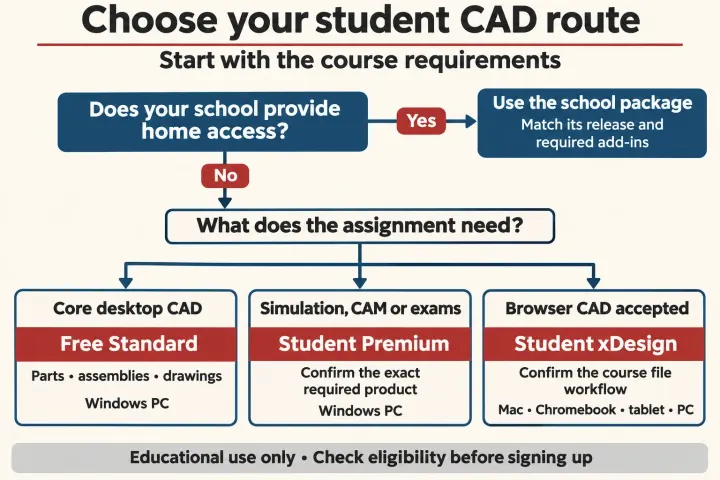
Ask your course administrator whether your institution provides SOLIDWORKS for your own computer, which release it uses and which products the assignment requires. A qualifying institutional licence can include home-use access at no extra cost to you. If the school supplies Design Premium, SOLIDWORKS recommends using that fuller package instead of signing up independently for Standard.
Without that access, the free Design Standard offer provides core parts, assemblies, drawings, sheet metal and weldments for one year. You can submit the form again while still qualified; student verification may be requested. Separate Simulation, CAM and Visualize products and certification vouchers aren't included. A course asking for an add-in or an exam voucher therefore needs another access check, even when its basic part-modelling exercises work in Standard.
The student application defines an eligible student as someone enrolled in a formal secondary or post-secondary institution. An old university email address after graduation doesn't establish that status. For the individual route:
- Confirm that the required work is educational and that your Windows computer meets the requirements for the supplied release.
- Complete the official form with your current institution and the required details, then review the linked terms.
- Keep the supplied download instructions and unique serial number. Use that entitlement for installation and activation, following the Standard installation guide.
If you're under 18, get the access route confirmed before applying: the form permits ages 13–17 with a parent or guardian's involvement, but its linked licence agreement defines the customer as at least 18. Ask your school administrator or SOLIDWORKS to resolve that difference for your application.
Free Standard is for personal learning under an educational institution's supervision. The student licence agreement excludes commercial work, consulting, work-for-hire, corporate or government internships and instruction. The form also excludes research applications. Preserve any educational watermark on the output; being able to open a student file in another product doesn't change its permitted use.
For an internship, use the employer's suitable seat or investigate the separate SkillForce programme. It requires acceptance, eligible student status, a confirmed employer placement and the certification process described by the programme. A student Standard serial number alone doesn't cover the employer's project.
Design Premium for Students and browser-based xDesign for Students are paid alternatives, each listed at US$60 a year for one user before local taxes; local prices appear in the cart. Use the student package comparison to distinguish the installed Windows package from the separate browser product. Our student access and installation guide covers course compatibility, activation and renewal in detail.
The free trial runs SOLIDWORKS in a browser session
For a first evaluation, start at the official Online Product Trials page and select Try now under SOLIDWORKS. It offers SOLIDWORKS Design Premium, including Simulation and Visualize, through an online trial. This is streamed desktop SOLIDWORKS; it isn't the separate xDesign product or a permanent browser CAD subscription.
The link leads to MySolidWorks. Your 3DEXPERIENCE ID connects you to the product trial, so sign in or create that free account when prompted. Review the evaluation terms and the access allowance shown for your session. Don't assume that an old “30-day trial” article describes the offer you're opening: the current product-trial FAQ describes a session countdown rather than one universal number of days.
I'd start with a sample part and make one deliberate change, then inspect the result in an assembly or drawing. That checks the workflow you want to learn without putting a confidential customer model into a new online environment.
The official trial instructions explain the controls that protect your work:
- Use My Files to upload a practice file to Home Folder. In SOLIDWORKS, uploaded files are available under This PC > Home Folder.
- Save new or changed documents to Home Folder, then select the saved file there to download it to your computer. Files left elsewhere in the evaluation instance are lost when the session closes.
- Watch the countdown. A session can also end after ten minutes without keyboard or mouse activity. A disconnected session is preserved for ten minutes; unsaved changes can then be lost.
Download and check your files before using Profiles > End Session. A longer evaluation on your own workstation is a different request: give a reseller the required release, add-ins, hardware and data conditions, and have the evaluation period and rights confirmed. The online session doesn't establish ongoing production access after it ends.
Makers is the paid route for ongoing personal projects
If you've graduated and want to keep practising desktop SOLIDWORKS, the regular Makers offer is paid. The Makers page lists US$48 a year or US$15 a month before tax and also advertises a US$24 annual promotion. Treat the promotion as an offer to check in the local cart, rather than a permanent renewal price.
The two choices are separate subscriptions. 3DEXPERIENCE SOLIDWORKS for Makers installs SOLIDWORKS Connected on a Windows PC and offers local and cloud storage. SOLIDWORKS xDesign for Makers works in a browser on devices including Macs, Chromebooks and tablets; buying it doesn't include SOLIDWORKS Connected. If the aim is to practise the desktop interface used in a course or job, choose the desktop package on suitable hardware.
A money-back policy is still a purchase. Annual Makers subscriptions have a 15-day refund policy, with monthly subscriptions and renewals excluded from that refund. The Makers purchase FAQ explains availability and renewal: subscriptions generally renew automatically, with India an exception, and stopping renewal leaves access until the term ends. Check the renewal amount and cancellation deadline before paying.
Don't treat the small-sales limit as a general business licence
Makers is intended for personal projects. Its official wording isn't consistent enough to reduce the sales rule to one number: the offer page uses annual revenue below US$2,000, the purchase FAQ says profit up to US$2,000, and the consumer offering terms refer to commercial purpose or annual gain. Revenue and profit aren't interchangeable.
Before selling a design or a part, get written confirmation that the specific activity is permitted under your offer. I wouldn't start client design or a business product on Makers on the strength of a forum's earnings threshold. Use a commercial licence or an approved startup route for professional work, and settle the native-file requirement before creating the model.
A makerspace membership can provide a free year
Members and managers of a valid makerspace can apply for a free annual licence of either Makers package. On the makerspace application, choose the package and provide your makerspace's name and website to confirm membership. Each request is reviewed; the page says approved access instructions arrive by email within two weeks.
The offer is valid for one year and is available in 25 listed countries, including the US and UK. Use that application's free-offer list: the paid Makers product is sold in a wider set of countries. Don't budget for a second free year without a further offer. You receive a Makers licence, so the personal-project conditions and native-file restrictions still matter; membership doesn't convert it into a commercial seat.
Hardware startups can apply for a free first year
The SOLIDWORKS for Startups Program is for a company designing and building its own physical product to sell. The published criteria are less than US$1 million in revenue and no more than five years in business. Funding, the business and the product also affect the decision.
Current SOLIDWORKS customers, service providers, engineering or design firms, consultants and contract manufacturers are excluded. A new freelance CAD service therefore doesn't qualify simply because its turnover is small. A business with revenue or funding between US$1 million and US$5 million may instead be considered for the programme's Scale-Up discount, at SOLIDWORKS' discretion.
Submit the application, wait for the review email and, if accepted, obtain access through the assigned local reseller. The published progression is the first year free, 70% off year two and 50% off year three. Confirm the issued package and future costs before building the project budget around it: “free for startups” doesn't mean every new company receives a permanent free licence.
Use free eDrawings when you only need to open the file
The desktop eDrawings Viewer is free for Windows and Mac. It opens SOLIDWORKS parts, assemblies and drawings, eDrawings files and DXF/DWG. The mobile iOS and Android apps are separate paid products, and eDrawings Professional adds paid capabilities.
A viewer lets you inspect the supplied design; it doesn't let you revise the part's driving dimensions, features or assembly mates as a CAD modeller would. Review tools have conditions too: Measure requires a measure-enabled file. If measuring is unavailable, ask the sender for a suitable review file rather than buying a modelling seat solely to read it.
Check what the next person needs to edit
The cost of access is only half the decision. Native SLDPRT, SLDASM and SLDDRW files made with Makers are digitally marked and cannot be opened in commercial or academic SOLIDWORKS. Buying a commercial licence later doesn't provide an automatic Makers upgrade or turn those files into unrestricted native models.
You can share neutral formats such as STEP, but a STEP geometry export serves a different purpose from the original editable feature history. If the recipient needs to change the bracket's driving sketch dimension or retain assembly mates, agree on a native workflow and suitable licences before modelling. If they need solid geometry for a permitted fabrication hand-off, agree on the neutral format and verify the exported bodies, units and assembly content.
Exporting also doesn't remove educational-use restrictions. Keep the original files and licence provenance, and tell the recipient which product and release created them. For an assembly, send its referenced parts together; a lone assembly file is not a complete package. For temporary access, download the native files and any required exports while the licence or session is still available.
For paid design work, budget for a commercial seat
Client design, consulting and ordinary business production need a licence that covers that work. The single-user SOLIDWORKS Design Standard offer is listed at US$2,820 a year before local taxes, with local pricing in the cart. That's the named-user offer; device-licence and other packages are separate buying decisions.
Confirm the required add-ins, file release and recipient's editing needs before choosing the package. Desktop SOLIDWORKS also needs supported Windows hardware; a free entitlement doesn't remove that requirement. For a Mac, our SOLIDWORKS on Mac guide separates browser xDesign, remote Windows access and desktop installation constraints.
For a student learning core CAD, I'd take the school's suitable access first and free Standard second. For a nonstudent refreshing desktop skills, start with the trial, then choose an ongoing personal-use or commercial route that fits the work. Decide where the model must go next before the first sketch becomes a file you cannot hand over as intended.